In April 2026, I worked one-on-one with roughly thirty tourism businesses and organizations in Quebec’s Eastern Townships through an individual AI coaching program. Over the course of the month, that added up to more than 45 Zoom sessions — about fifty hours of conversation. It followed a similarly successful program I ran in 2025 with about sixty tourism businesses across the Eastern Townships and the Montérégie region.
When Tourisme Cantons-de-l’Est handed me this mandate, I expected to talk about ChatGPT, Copilot, Claude, marketing use cases, maybe some SEO. And I did, a lot. But what surprised me most was what came up instead of AI, in a surprising number of sessions: internal governance, missing permissions, no time to experiment, and a nagging sense of “am I even allowed to use this?”
Here are five lessons from that mandate.
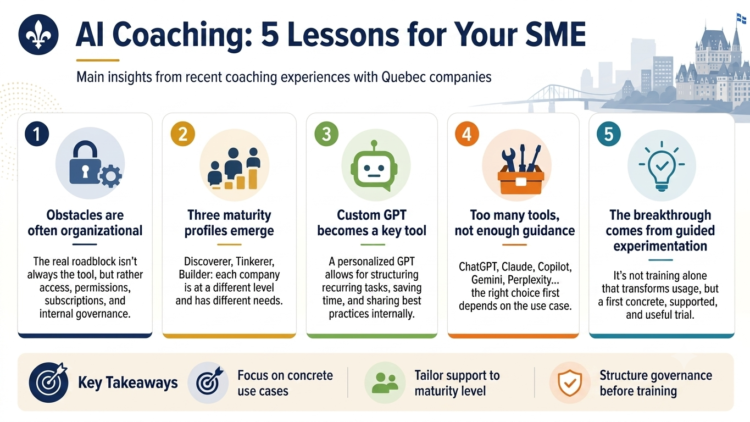
Lesson 1: The barriers are organizational, not technological
Last year’s experience already told me most tourism operators are open to AI tools, even when the interface feels intimidating or the vocabulary too technical. The technology itself is a hurdle, sure. But in the vast majority of sessions, the tool wasn’t the problem. The ecosystem around the tool was what stalled everything.
A few things I saw firsthand: a front-desk manager couldn’t edit a custom GPT her colleague had built the year before, because she’d never been given sharing rights — the GPT existed and worked fine, she’d just been waiting weeks for IT to step in. One property discovered mid-coaching that it was already paying about $900 a year for a ChatGPT Teams subscription almost nobody on staff knew existed; everyone kept using the free version and rebuilding their own workarounds from scratch. OneDrive and SharePoint connectors, which would have let ChatGPT actually work with internal documents, were switched off at the Microsoft 365 tenant level — no error message, just a silent wall you only find by trying. A Business account blocked features that worked fine on the same device’s personal account, so the employee just did her work from her personal login by default. And the recurring-tasks feature in ChatGPT, which automates a weekly watch on competitors or reviews, is off by default and needs an IT ticket to turn on.
The lesson: before you invest in tool training, invest in internal governance. Who has access to what? Who can configure what? Where are the active subscriptions? What’s the process for turning a feature on? Without that groundwork, training lands on sand — and usage stays limited no matter how good the workshop was.
Lesson 2: Three maturity profiles in AI adoption
Across the 45 sessions, three participant profiles emerged clearly, and naming them changes how you’d build a program for future cohorts.
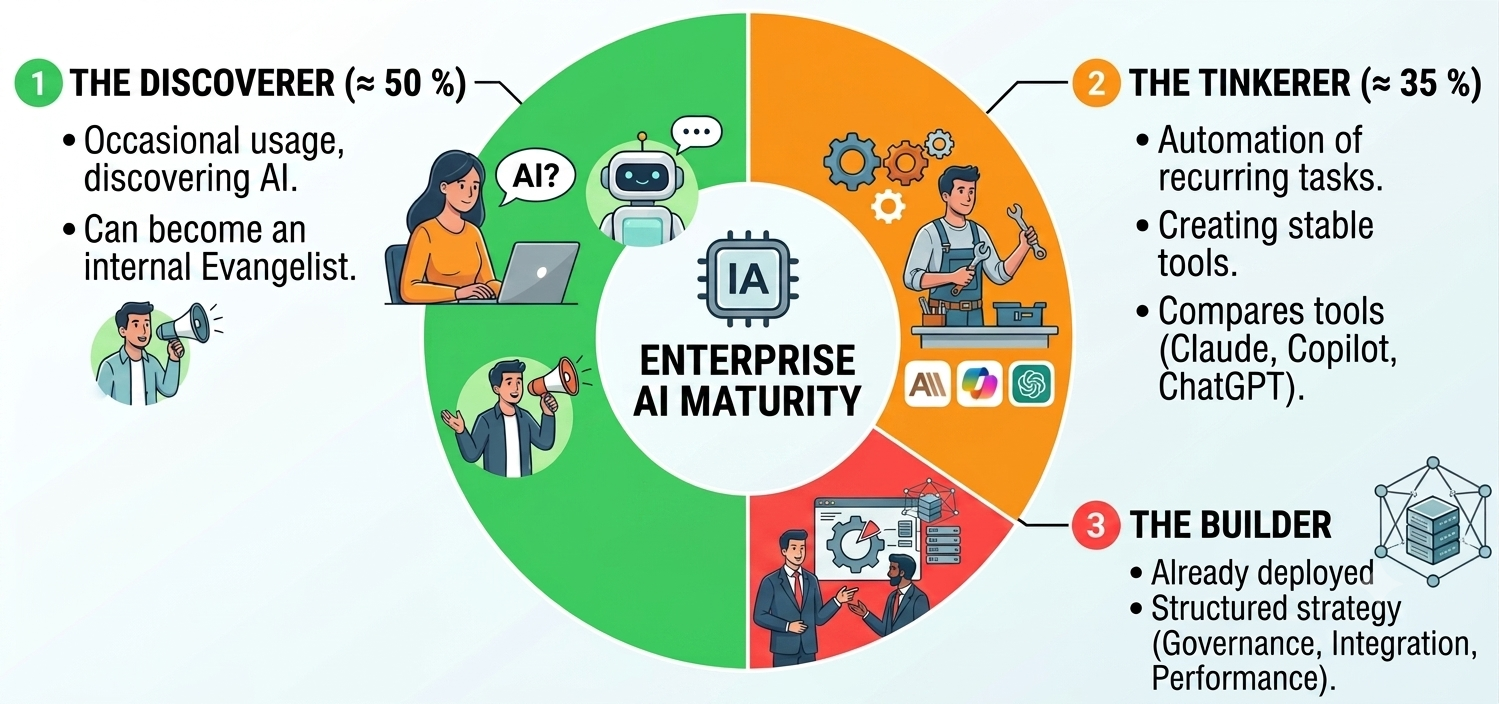
The Explorer (roughly 50% of businesses). Has heard of ChatGPT, maybe tried it once or twice, but hasn’t built it into daily routines — think a small inn owner curious about using it for guest emails. The session that works: build one concrete use case live, from a real task. When an Explorer leaves with a custom GPT that saves three hours a week, they become an internal evangelist.
The Tinkerer (roughly 35% of businesses). Already uses ChatGPT for one-off tasks — drafting a newsletter blurb, brainstorming a promotion. Wants to level up: build stable tools, automate part of the recurring work, understand where Claude, Copilot, and ChatGPT each pull ahead. The session that works: structure a custom GPT around one recurring deliverable, and give them the vocabulary to choose between tools.
The Builder (roughly 15% of businesses). Has already rolled out AI use cases somewhere in the operation — a ski resort or DMO running several workflows, say. Wants to structure a real strategy: governance, sharing across teams, integration with existing systems, tracking performance. The session that works: pop the hood, talk architecture, talk trade-offs. It’s a conversation between equals.
When a regional program has to serve all three profiles at once, one-on-one coaching becomes almost the only option. It’s the one format that naturally adapts to wherever each person is starting from.
Lesson 3: The “custom GPT” became the star deliverable
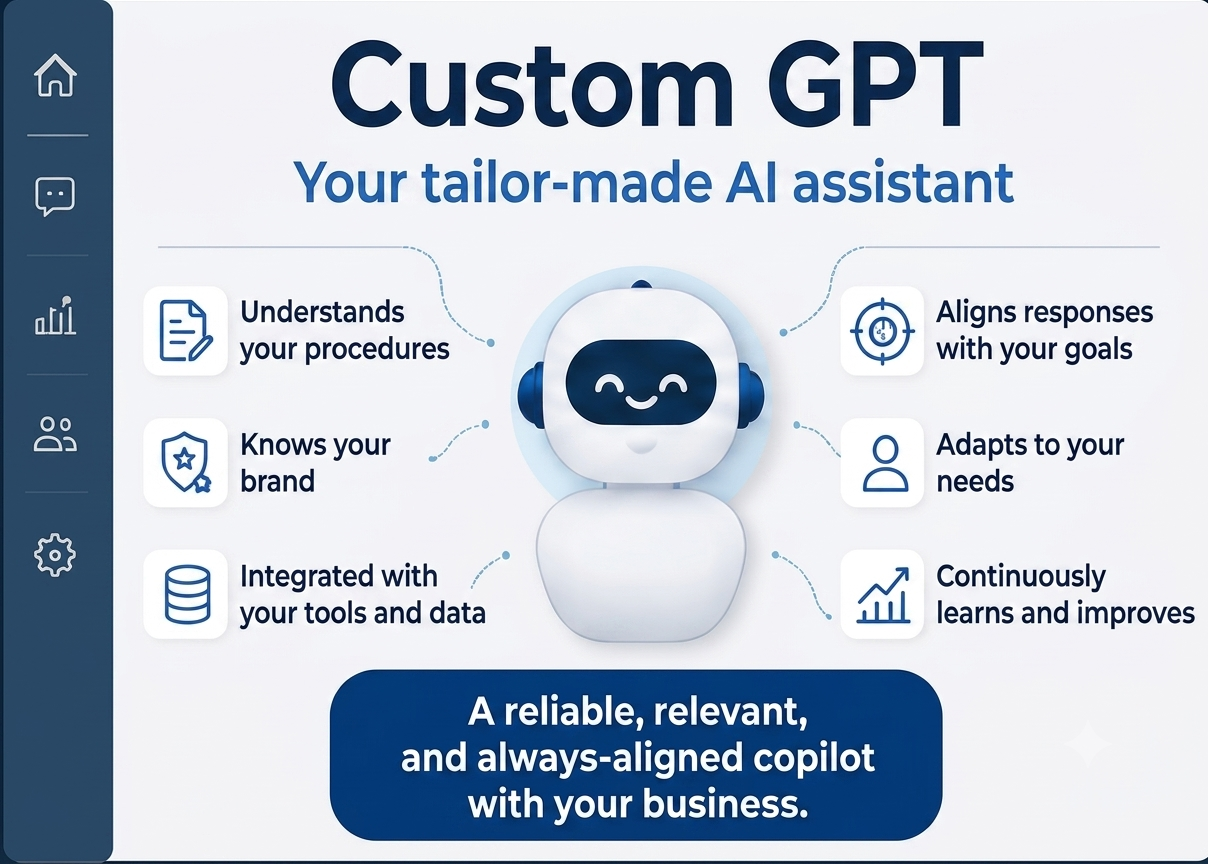
If I had to pick one concept to remember from this mandate, it would be the custom GPT. You personalize your own ChatGPT for a specific job, with its own reference documents, its own tone, its own steps to follow. The result is a stable tool that delivers the same quality every time, and that can be shared across a team.
More than half the sessions ended up building or improving a custom GPT. The use cases that came up again and again: sorting 72 seasonal job applications for 5 openings, with a pre-configured GPT separating the relevant candidates in minutes. Template replies to Google and TripAdvisor reviews, matched to brand voice, never signed “by AI.” Turning a 60-page staff handbook into an 8-minute audio podcast via NotebookLM whereas a document nobody read becomes an onboarding tool people actually listen to. Generating a promotional video for a museum straight from the website URL, aimed specifically at school groups and tour groups. Custom drafts for recurring emails (event-space rentals, sponsorship requests, guest FAQs) genuinely useful once you’re past 20 emails a day.
The beauty of the custom GPT is that it bridges two worlds: the DIY ChatGPT tinkering people discover on their own, and the “enterprise AI project” that sounds out of reach. It’s a deliverable anyone can build in 30 minutes, provided they have the right reference documents and a coach to structure the instructions. The same exercise also works in Google’s environment (Gems) and in Claude (Projects).
Lesson 4: Tool fragmentation has become its own challenge
ChatGPT, Claude, Copilot, Gemini, Perplexity, Mistral, Notion, Make, n8n… the market is saturated with tools that look alike on the surface but have very different strengths. And nearly every session brought the same question: “Which one should I use?”
My honest answer is always the same: it depends what you’re doing with it. For day-to-day work inside Microsoft 365 (Word, Outlook, Teams, Excel), Copilot has an integration edge nobody else matches, especially with a Copilot Pro license and its secure connectors. For long, nuanced writing built from large source documents — think a full guest-experience audit or a grant application — Claude leads on reasoning quality and nuance. For custom GPTs and the broader ChatGPT-friendly ecosystem (plugins, GPTs, sharing), ChatGPT Plus is still the de facto standard. For monitoring and sourced research, Perplexity remains unbeatable on reference reliability.
The ability to reason through those trade-offs is itself a skill worth building and that’s exactly where human coaching earns its keep. No tool is ever going to tell you “you should really use my competitor for this.” A coach will. Provided they’re impartial, which is non-negotiable.
Lesson 5: The real trigger is rarely the training itself
“I don’t have time to play around with ChatGPT” was probably the single most-repeated line of the whole mandate. And yet, in nearly every case, ten minutes of hands-on experimentation during the session sent participants home with a tool that saves them several hours a week.
So the challenge isn’t time in the absolute. It’s the first step: until someone gets through one genuinely useful attempt, AI stays filed under “risky investment.” What if I waste 45 minutes for nothing? One-on-one coaching is precisely the setting that lets someone clear that hurdle with a safety net.
One session sticks with me: a hotel operations manager who mostly used Gemini for her Google Workspace was floored to learn about features already sitting inside the platform : Canvas mode, for building infographics, PowerPoint-style decks, even editing an Excel-style spreadsheet. “My God, I had no idea you could do any of that in Gemini,” she told me. Fair enough, nobody can keep up with how fast these tools move, and that’s exactly why a specialized coach can hand you a handful of tricks relevant to your specific reality.
What struck me most was watching busy, seasoned professionals walk out of a 60-minute session with three working use cases built, a couple of IT tickets to file, and a clear sense of what to do next. It’s the opposite of the “here are 50 prompts to try” posts flooding LinkedIn feeds.
The lesson for regions and associations: a group workshop will never replace a 1-on-1 session for moving a business from “I know I should get on this” to “I have my first tool up and running.” Individual coaching costs more per hour, but it’s unbeatable per result.
What’s next
This mandate has wrapped, but the work it opened up continues across the Eastern Townships. For other tourism regions, chambers of commerce, or regional associations considering a similar program, here’s what I’d suggest:
Map your membership’s AI maturity before you build any content. Explorers, Tinkerers, Builders each need something different, ideally tailored. Invest in governance before, or alongside, training: permissions, active subscriptions, connectors, etc. Unglamorous work, but it’s what unblocks everything downstream. Choose a format that adapts to each participant; one-on-one coaching isn’t a luxury, it’s often the most cost-effective format per result. Document the use cases that worked, real stories travel further than prompt lists. And plan a follow-up at 3 and 6 months: the spark happens during the session, but adoption happens in the weeks after.
Do you represent a tourism association, chamber of commerce, or industry group looking to guide your members through AI adoption? I’d be glad to talk it through. Feel free to reach out.








Leave a Reply